00. matplotlib 개요
(1) 한글 폰트 사용을 위한 설정
import matplolib.font_manager as fm
import matplotlib

font_path = ' ' # 내 파일에 font 들어가서 경로 복사해오기
font = fm.FontProperties(fname=font_path).get_name()
matplotlib.rc('font', family=font)
(2) figure과 axes
- figure : 전체 그림이 그려지는 컨테이너
- axes : 그래프가 실제로 그려지는 영역 (좌표, 데이터)
fig = plt.figure(figsize=(6, 4), facecolor='green') # facecolor : 그래프의 바깥 배경색 설정
print(fig)

ax = plt.gca()
ax.plot([1, 2, 3], [4, 5, 6])
print(ax)

plt.title('Hello Matplotlib')
plt.xlabel('X')
plt.ylabel('Y')
plt.show()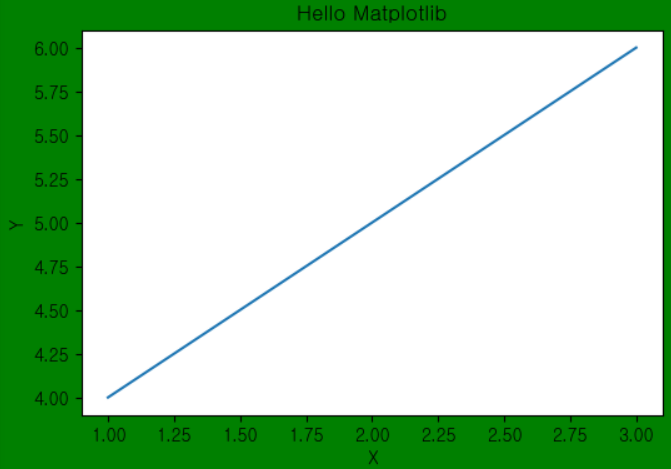
(3) plot의 매개변수
1. plot 메서드 속성


plt.plot(
	x,
    y,
    color = 'black',
    marker = 'o' # 마커모양 (이외에도 ^, D 등 다양하게 가능)
    markersize = 5, # 마커크기
    linestyle = '--', # 선 스타일
    linewidth = 2
)


2. plt 속성
plt.xticks(rotation = 90) # x 눈금이 왼쪽으로 90도 회전
plt.yticks(rottion = 45) # y 눈금이 왼쪽으로 45도 회전

plt.xlim(1, 50) # 보여지는 범위를 재지정해준다. (만약 범위가 넓은 경우 국소적으로 못보기 때문!!)
plt.ylim(2, 100)

plt.grid(True) # plt에 격자 표기
01. histogram
- 연속형값의 도수(빈도수/개수) 파악
scores = [100, 95, 97, 98, 99, 90, 80, 81, 84, 88, 70, 78, 79, 70, 65, 66, 61, 64, 100, 89]

bins = [60, 70, 80, 90, 100]
plt.hist(scores, bins=bins, edgecolor='black', rwidth=0.95)
# bins : 나뉠 구간의 갯수 (기본값 = 10)
# edgecolor : 히스토그램 막대의 경계선 색상
# rwidth : 0~1 사이의 값으로 상대적 너비 조정

plt.xlabel('점수')
plt.ylabel('인원수')
plt.title('점수별 인원도수표')
plt.show()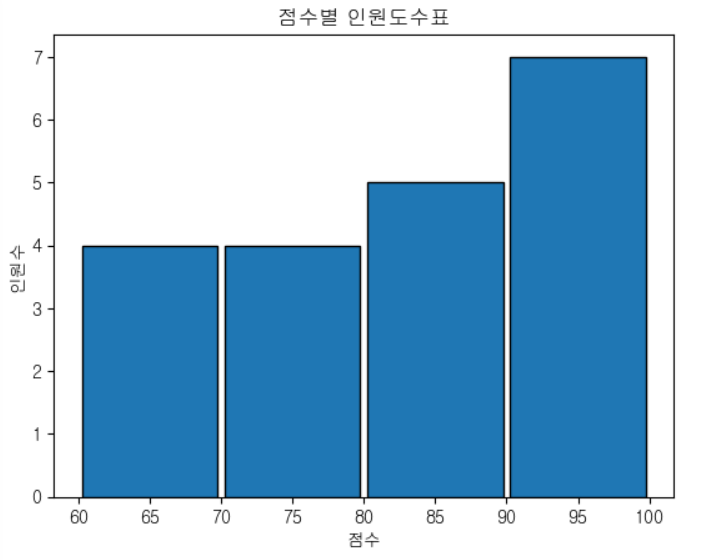
plt.hist(scores, edgecolor='black', rwidth=0.95, cumulative=True)
# cumulative : 누적 값
plt.show()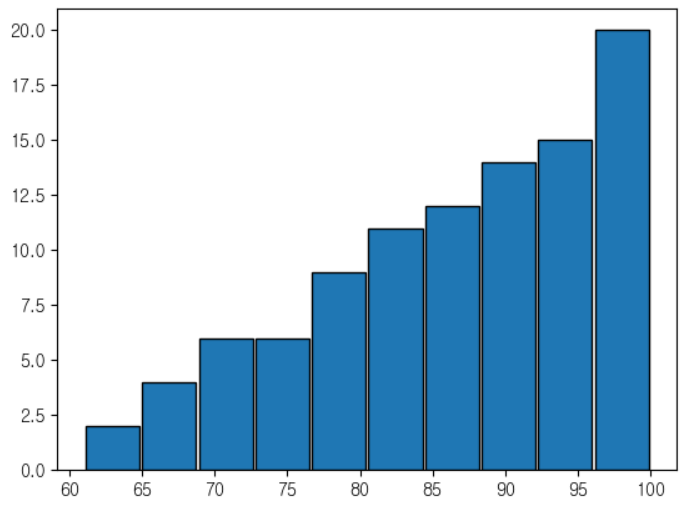
02. bar / barh plot
- 범주형값의 개수, 또는 다른 연속값을 파악
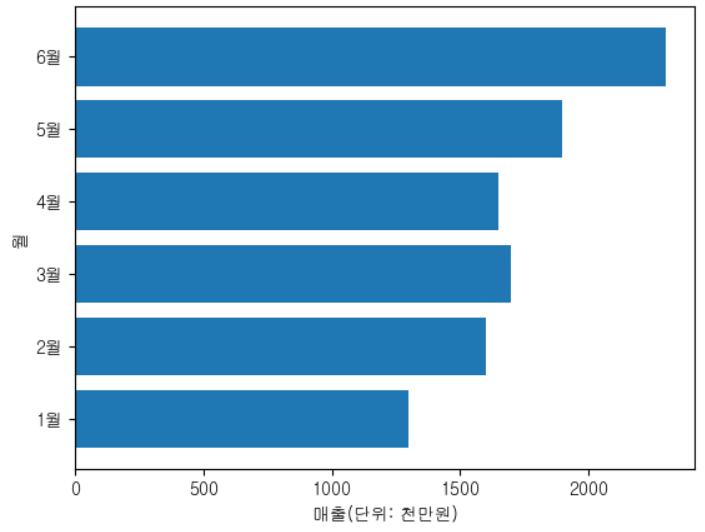
# 월별 매출 데이터
df = pd.DataFrame({
    'months': ['1월', '2월', '3월', '4월', '5월', '6월'],
    'sales': [1300, 1600, 1700, 1650, 1900, 2300]
})

# zorder : z축 깊이 설정 (값이 클수록 앞으로 나옴)
plt.bar(df['months'], df['sales'], zorder=10)

for i, val in enumerate(df['sales']):
    # x축 위치, y축 위치, 텍스트, 텍스트 정렬(위치)
    plt.text(i, val + 100, str(val), ha='center')

plt.xlabel('월')
plt.ylabel('매출(단위: 천만원)')
plt.grid(zorder=1)
plt.show()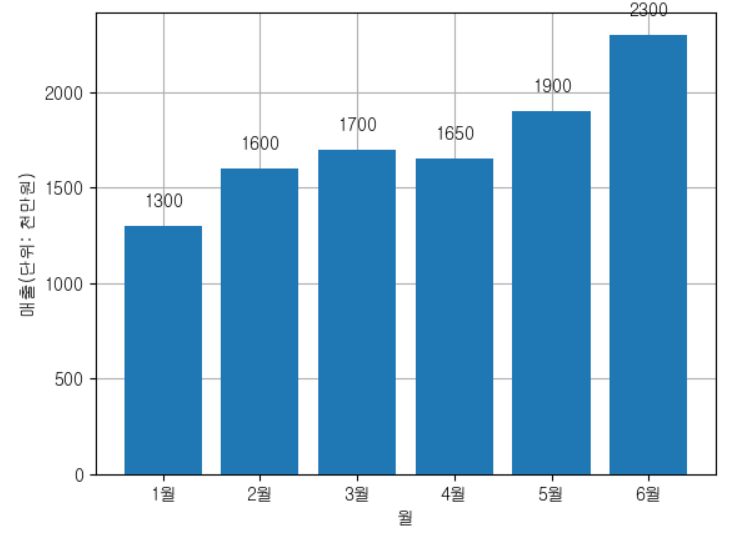
# bar(수직막대그래프) => barh(수평막대그래프) 일 시에는 xlabel과 ylabel을 바꾸어줘야한다.
# 수평 막대그래프
# - x축 : 연속형
# - y축 : 범주형
plt.barh(df['months'], df['sales'])

plt.ylabel('월')
plt.xlabel('매출(단위: 천만원)')
plt.show()
03. scatter plot
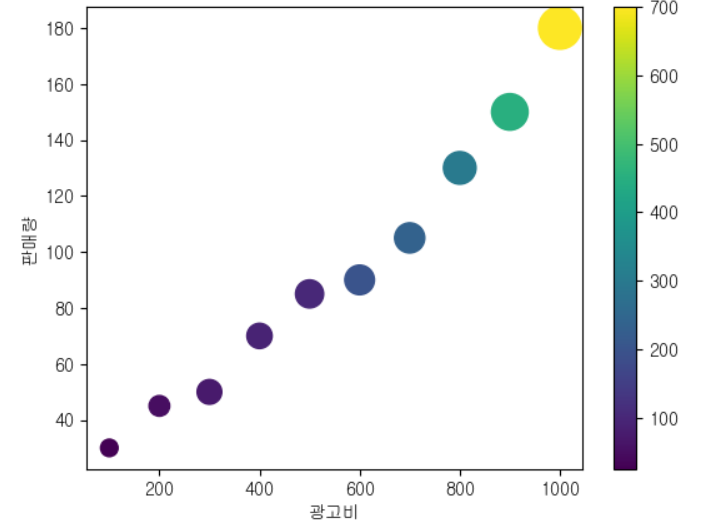
- 산포도 두 연속값들의 분포 파악
- 두 변수 간 상관관계, 클러스터링, 이상치 파악에 도움
df = pd.DataFrame({
    'ad_budget': np.arange(100, 1001, 100),
    'sales': [30, 45, 50, 70, 85, 90, 105, 130, 150, 180],
    'visitor': [100, 140, 200, 210, 260, 290, 300, 350, 440, 600],
    'colors': [25, 50, 70, 90, 100, 200, 235, 300, 450, 700]
})

# x축, y축, s=점의 크기, c=점의 색상(컬러 값으로 연속 데이터 표현)
plt.scatter(df['ad_budget'], df['sales'], s=df['visitor'], c=df['colors'])

plt.colorbar()

plt.xlabel('광고비')
plt.ylabel('판매량')
plt.show()
04. line plot
- 시계열 데이터의 변화 파악
df.plot(
    x='Date',
    y=['APPL', 'MSFT'],
    color=['black', 'yellow'],
    label=['apple', 'microsoft'],   # legend 설정하지 않아도 만들어짐
    subplots=True                   # subplot 형태로 그림
)

plt.xlabel('날짜')
plt.ylabel('주가')
plt.show()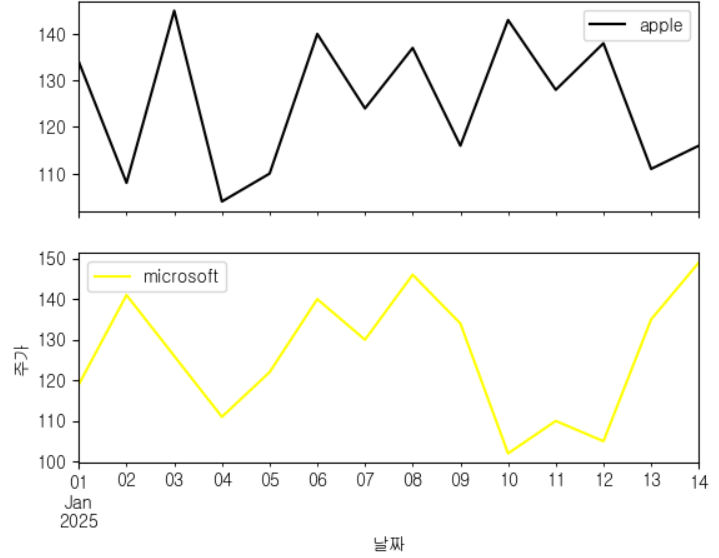
05. box plot
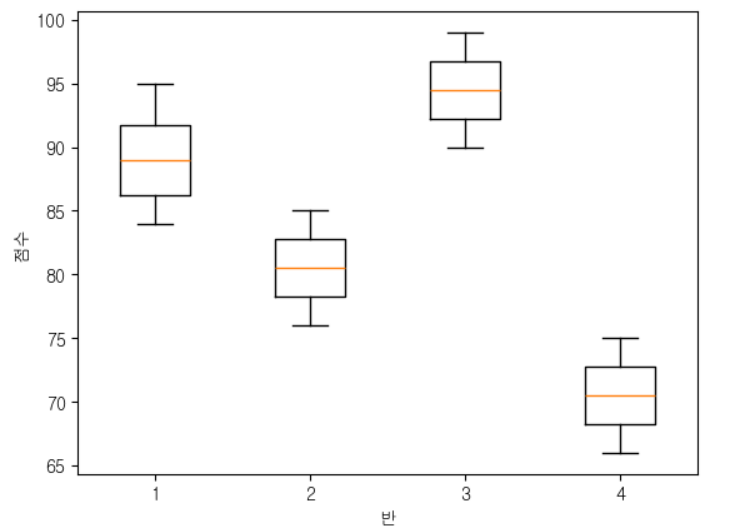
- 연속형 값의 사분위, 이상치 파악
data = class_scores[0] # class_scores의 첫번째 데이터프레임 (첫번째 그룹)

print('최소값:', np.min(data))
print('사분위수(Q1):', np.percentile(data, 25))
print('사분위수(Q2):', np.percentile(data, 50), np.median(data))
print('사분위수(Q3):', np.percentile(data, 75))
print('최대값:', np.max(data))

[출력]
최소값: 84
사분위수(Q1): 86.25
사분위수(Q2): 89.0 89.0
사분위수(Q3): 91.75
최대값: 95
06. pie chart
- 전체 범위 중의 비율
df = pd.DataFrame({
    'label': ['애플', '삼성', '샤오미', 'LG'],
    'market_share': [33, 32, 10, 25],
    'sales': [1345, 234, 545, 454],
    'explode': [0, 0.1, 0, 0]
})

plt.pie(
    df['market_share'], # 들어갈 데이터값,
    labels=df['label'], # 데이터값의 라벨,
    autopct='%.1f%%', #
    startangle=90,
    explode=df['explode'],
    colors=['skyblue', 'lightgreen', 'lightcoral', 'gold']
)

plt.title('기업별 시장 점유율')
plt.show()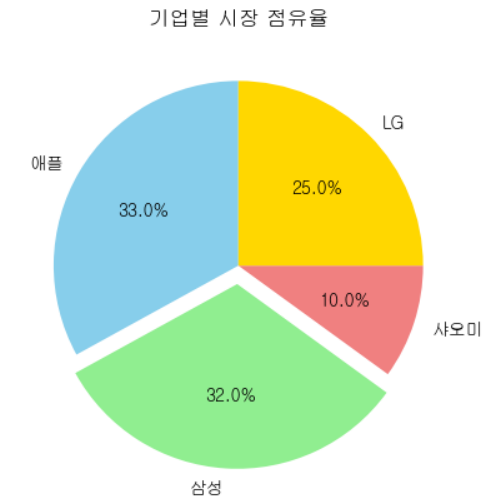
'SKN > 04. Data Analysis' 카테고리의 다른 글
| 04. 데이터 결측치 확인 (0) | 2025.03.06 |
|---|---|
| 03. pandas overview (0) | 2025.03.04 |
| 02. numpy [통계] [정렬] [병합] (0) | 2025.02.28 |
| 01. numpy overview (1) | 2025.02.28 |